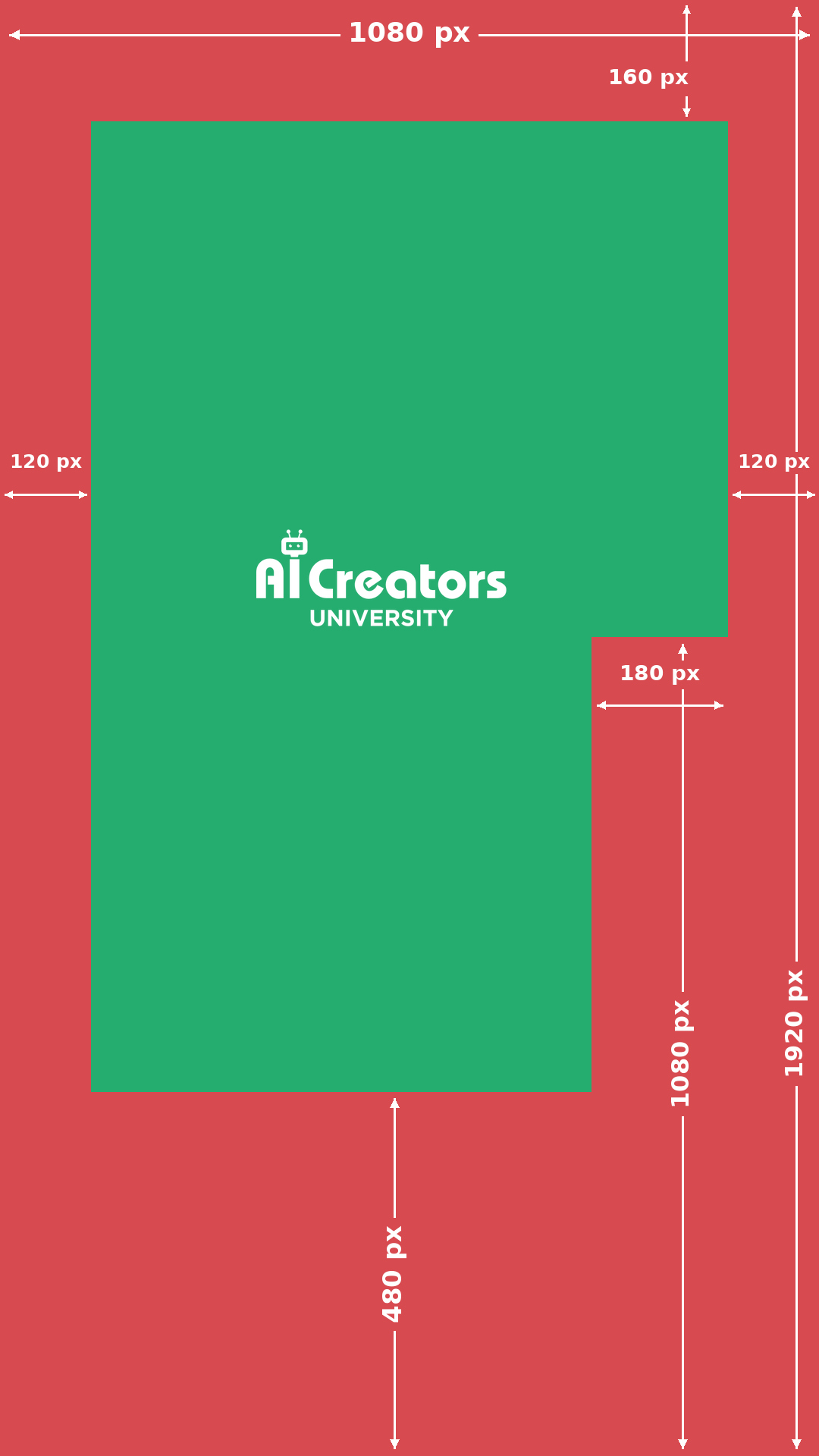
Green for the important parts
Keep your headlines, subtitles, logo and call to action inside the green area. Leave a little extra room around the boundary.
Red leaves room for TikTok
Keep essential text and details out of the red areas. Your background can continue behind the app’s buttons, caption and navigation.
The margins in this template
The download uses a 1080 × 1920 pixel canvas.
- Top
- 160 px
- Bottom
- 480 px
- Left and right edges
- 120 px each
- Extra space for the lower-right controls
- 180 px inside the right margin, starting 840 px from the top. This reserves 300 px from the right edge in the lower section.
These are the working margins in our template. TikTok’s interface can vary by device, caption and post format, so check your final post in the app.
Use it in four steps
- Fit the whole JPG to your project. Start with a 1080 × 1920 canvas and keep the guide’s proportions.
- Lower the guide’s opacity. Put it above your footage as a temporary layer.
- Check the full edit. Review the opening hook, longest subtitle, logo and final call to action.
- Hide the guide before exporting. Preview the finished post in TikTok with your intended caption and settings.
For a 2160 × 3840 project, double every measurement.
Using this for an ad?
Use TikTok’s official template for your ad format, language and added features. Ad safe zones depend on the dimensions, caption length and additional formats.
Share it with your editor
Send the original JPG above so they have the complete pixel guide. When sharing it as a feed image, keep the whole diagram visible in the crop.
Posting somewhere else?
- Instagram Reels safe zones
Keep your hook clear and check your Reel and cover separately.
- Facebook Reels safe zones
Check your vertical edit in Facebook before you cross-post.
- YouTube Shorts safe zones
Use YouTube’s visual guides to position text and stickers.